
Home Offices in Canada: Should I Build One?
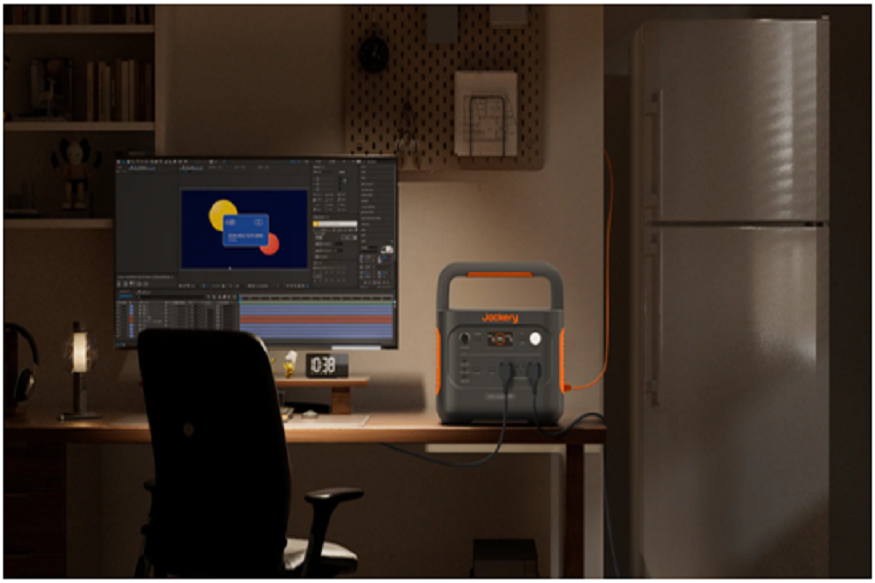
As hybrid work continues to reshape the professional landscape, more people are rethinking their home environments to meet the demands of a flexible, modern career. In the first quarter of 2025, nearly 29% of new job postings in Canada were for hybrid roles, according to national employment data.
This new norm has led to a surge in home office construction and renovation projects across the nation. But is it worth the investment, and what does it really take to do it right?
Let’s take a closer look at home office benefits, challenges, and key essentials such as solar energy generators.
What Are the Benefits of Having a Home Office
Making a good home office comes with the following benefits:
1. Separation of Work and Life
When you don’t have a dedicated home office, you risk blurring the boundaries between your professional and personal life. Working from the same space where you eat, relax, and sleep creates confusion in your routine. When there is no physical line between job and home life, the mental boundary fades as well. That is why a separate workspace is important, as it sets the tone for the day, brings clarity to your life, and keeps you disciplined.
2. Space for Focused, Productive Work
While working from home, it becomes extremely difficult to focus. The quality of your attention depends heavily on the environment around you. Makeshift setups, like working from a couch or shared surface, cannot offer you the consistent environment that is needed for productive sessions.
However, with a designated room or just a properly arranged corner, you get the ability to control sound, lighting, layout, and pace of your work. A quiet, organized workspace lets you settle into deeper focus and finish complex tasks without being pulled away by clutter, movement, or background conversations.
3.Custom Comfort and Efficiency
You can always shape your home office around your own highly specific needs. You can choose a specific chair that supports your posture, set your screen height correctly, or adjust the lighting for your comfort. This freedom to design the space leads to fewer physical aches, less strain, and a more efficient workflow. Over time, working in a space built around your routine leads to better performance and less fatigue.
Key Considerations When Building a Home Office
While the idea of having a home office sounds simple, building one that truly supports your day-to-day work requires more than just placing a desk in a spare corner. Before you start planning a home office layout or choosing furniture, here are some important things to consider:
1. Zoning
Zoning regulations define what types of structures are allowed in your area and how they can be used. If you are planning to build a separate office in your backyard or convert part of your home into a permanent workspace, zoning laws will determine whether that is permitted. These rules vary from one municipality to another, and every province in Canada applies its own standards.
For example, some residential zones restrict the use of detached buildings for work-related purposes or limit how much space can be used for non-residential activities. Checking with your local planning office or reviewing your municipality’s zoning map will give you a clear understanding of the limits.
2. Permits
If your plan includes building a backyard office or altering an existing structure, you will likely need a building permit. This applies to any addition that affects the electrical system, plumbing, or physical structure of your property. Without the proper documentation, even small projects can run into legal issues. Every city has its own permit process, and in many cases, applications must go through zoning and building code review before you can begin the project.
3. Weatherproofing
Canadian weather can get unforgiving, particularly during the winter months. If your home office is located in a converted garage, sunroom, or any detached space, insulation and sealing become essential. A poorly insulated room not only drives up your energy bills but also creates an uncomfortable work environment. Windows, doors, and wall finishes all need to be checked for drafts, moisture retention, and thermal resistance. A workspace that gets too cold in the winter or too hot in the summer won’t help you stay focused.
4.Connectivity
A stable, high-speed internet connection is one of the top necessities in any home office. Your ability to participate in meetings, access shared files, use cloud-based tools, or meet any deadline will depend on your internet connection. If your router is far from your office space or you experience frequent lag or signal drops, you will need to consider options like mesh networks, signal boosters, or even wired Ethernet connections.
5. Privacy
A productive office environment needs to feel separate from the rest of the home, especially in households with multiple people or children. Even a small amount of background noise can be distracting during focused work or calls. Soundproofing solutions, such as heavy doors, rugs, acoustic panels, or solid-core partitions, help block noise and protect your concentration. Visual privacy also matters, as not everyone feels comfortable working in a space where others can constantly observe their screen or activities.
6.Budget
Some home offices can be created on a modest budget with clever use of existing furniture and simple upgrades. Others, especially those involving new construction or major electrical work, require a larger investment. Set your priorities early. Determine what you need to get started and what can be improved over time. Spending on essentials like a good chair, reliable power supply, and solid connectivity usually brings the greatest return in terms of daily comfort and performance.
Essentials for a Home Office
Once you have the structure and layout of your home office in place, the next step is equipping it with the right essentials. These are the items that support your comfort, maintain your workflow, and help you stay productive throughout the day:
1.Desk and Chair
The foundation of any home office begins with a proper desk and chair. Working long hours on a kitchen chair or hunched over a low table can strain your back, neck, and shoulders. A chair that supports your spine and a desk that gives you enough surface area at the right height make a noticeable difference in how you feel at the end of the day. Make sure that you are choosing items that fit your body, reduce fatigue, and let you sit and work in a natural and upright position.
2. High-Speed Internet
An unreliable internet connection can break your focus faster than anything else. If your workspace is far from your router or you experience signal drops, a direct Ethernet connection or a mesh Wi-Fi system can solve most of those issues. Investing in better connectivity means fewer disruptions and smoother and more efficient work.
3. Good Lighting
Lighting will shape your energy levels, mood, and eye comfort. Natural light is ideal, but it’s not always available or consistent throughout the day. A well-lit workspace should combine overhead lighting with a focused desk lamp to reduce glare and shadows. Choose warm and adjustable lighting that won’t strain your eyes during long sessions.
4. omputer Setup
Your computer setup should match the type of work you do. A second monitor can improve multitasking. An external keyboard and mouse can reduce wrist strain. Even something as simple as a laptop stand can improve your posture by raising the screen to eye level. These small upgrades don’t take up much space, but they can greatly improve how fast and comfortably you work.
5. Storage and Organization
Without a storage system in place, clutter builds up quickly. Storage is not about how many drawers you have but how well your tools, files, and supplies are arranged. Open shelves, filing boxes, or vertical organizers can keep everything in order without taking up much room. When everything has its place, you spend less time looking for things and more time getting work done.
6. Enough Outlets
Modern work setups rely on a large number of electrical devices such as laptops, monitors, phone chargers, printers, and sometimes even lamps or speakers. A shortage of power outlets leads to tangled cables, unplugged devices, or unsafe extensions. If your office does not have enough wall sockets, consider installing a power bar with surge protection. It keeps everything powered and organized in one location.
7. Battery Backup
Power outages are becoming increasingly common in Canada. They can disrupt calls, corrupt files, damage sensitive electronics, and even force you to stop working at a time when you cannot afford to do so. That is where a battery backup will play its all-important role. It will protect your work during unexpected power outages by keeping essential devices running without interruption. They will also allow you to stay connected during meetings, avoid data loss, and continue working through power disruptions.
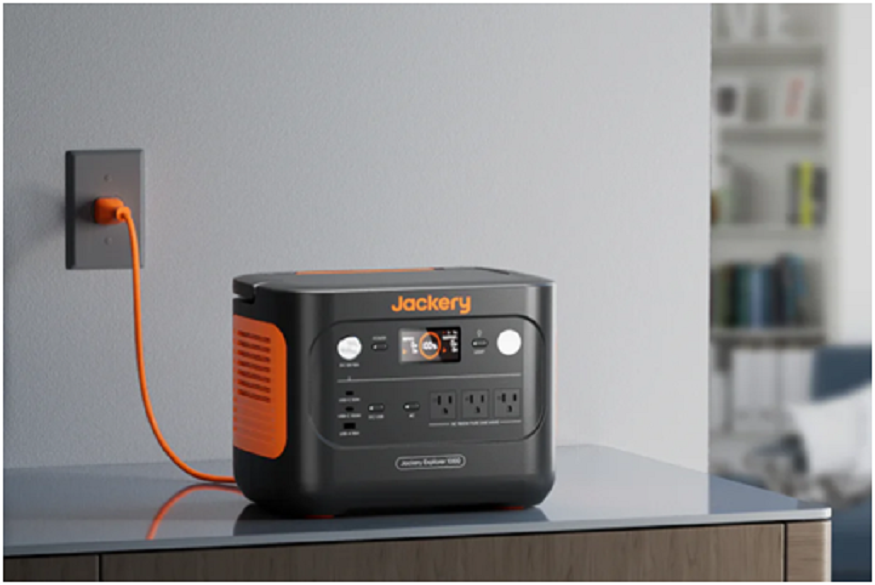
Jackery Solar Generator 1000 v2 for Your Home Office
Jackery provides various portable battery backups that will bring stability to your workflow. One of their top-notch portable power sources is the Jackery Solar Generator 1000 v2, which comes with the features needed in any home office.
1. Strong Performance
The Jackery Solar Generator 1000 v2 delivers a high capacity of 1070Wh and supports a power output of 1500W, sufficient to keep your laptop, internet router, and other office devices running at the same time. This portable notebook charger includes multiple USB ports for phones and smaller electronics, along with AC outlets for larger equipment. It is built for quiet indoor use and has no complicated setup process.
2. Multiple Charging Methods
The Jackery Solar Generator 1000 v2 also provides multiple charging options, which makes it a highly flexible product. It can be plugged into the wall, charged through a vehicle, or connected to solar panels. You can recharge it within 4 hours using 4 Jackery SolarSaga 200W Solar Panels. Similarly, you can also recharge this portable laptop charger using the wall outlet in just 1.6 hours and keep it ready for emergency usage all the time.
3. Portable and Lightweight
Weighing just 23.8 pounds and measuring 12.87 × 8.82 × 9.72 inches, the Jackery Explorer 1000 v2 Portable Power Station stores well in a closet or under a desk and does not take up much room. The handle can easily be folded when you don’t have to move the power station, and the entire structure feels like a small box.
4. Reliable Operation
This battery backup for home also includes a built-in safety system that manages temperature, prevents short circuits, and protects connected devices during voltage swings. With an uninterruptible power supply (UPS) response time of ≤20ms, it helps prevent data loss and protects your equipment during outages.
Wrapping-Up
As hybrid work mode now becomes a norm, a functional home office is more important than ever. Beyond providing comfort and helping you focus, it should be designed to support consistent productivity, protect your equipment, and keep you connected during disruptions. The Jackery Solar Generator 1000 v2 offers a reliable backup power solution with strong performance, multiple charging options, and long-term durability. It is a practical solution that keeps your workflow stable and uninterrupted in any situation.